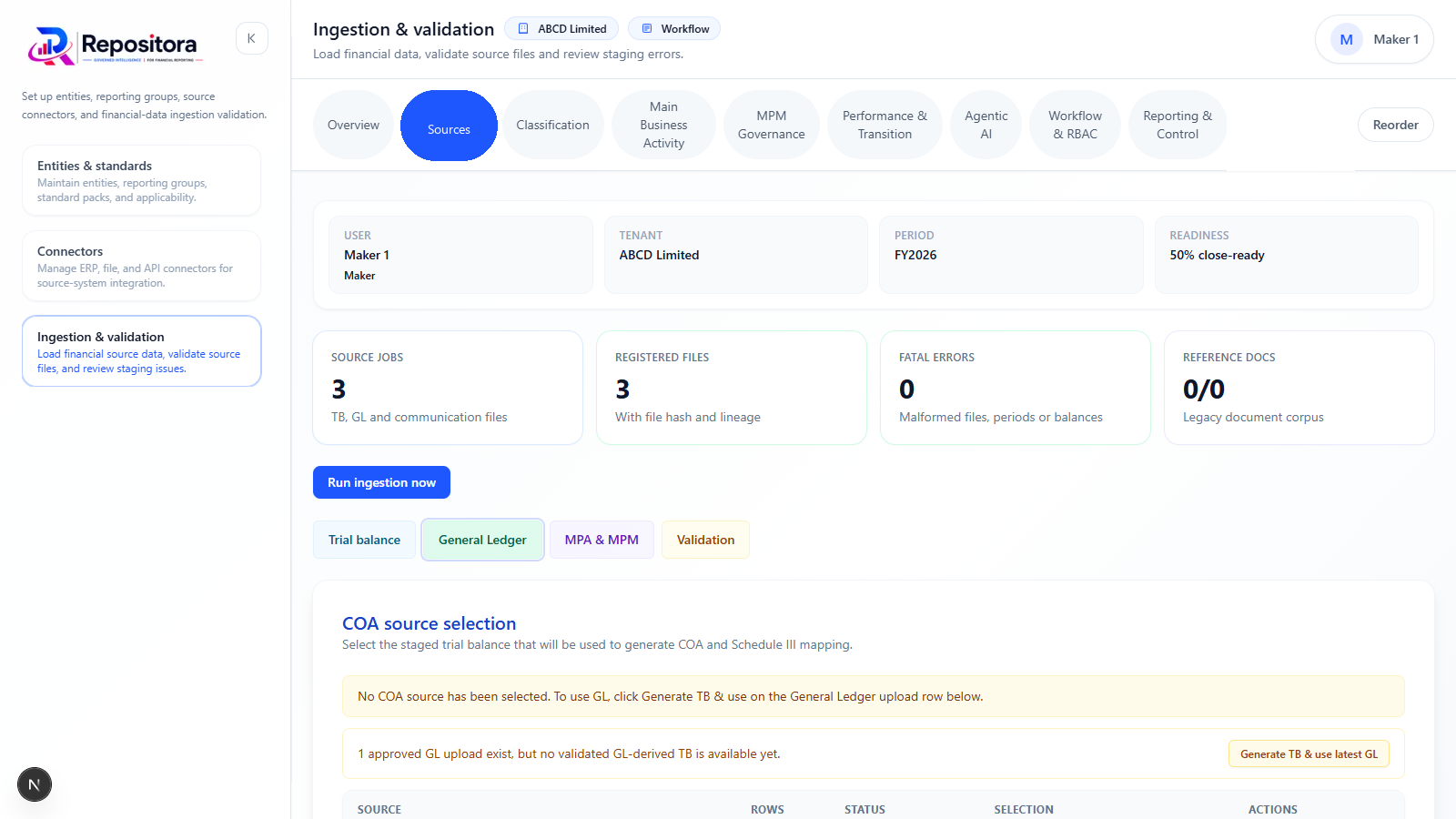
Most statutory reporting projects do not fail because the organisation cannot export a trial balance. They fail because each export behaves differently. One entity uses debit-positive balances, another uses credit-positive signs, a third places headers on row seven, and a fourth changes the worksheet name every month. Columns are renamed, blank rows are inserted, account codes lose leading zeros and duplicate files are uploaded. Finance teams compensate with manual spreadsheet transformations that are difficult to review and impossible to reproduce consistently.
A reusable import profile turns those transformations into controlled configuration. It records the source system, file or worksheet pattern, header row, account-code and description columns, amount fields, sign conventions, entity and period identifiers, currency, optional dimensions, transformations and validation rules. The profile can be reused each period, while each actual import remains a separately versioned event with a source file, preview, posting decision and audit trail.
This distinction is critical for Repositora. The platform should accept Excel, CSV, controlled reporting packages, SFTP or secure file drops, REST API submissions and manual structured entry without requiring native connectors to every ERP. A well-governed import layer provides much of the value of integration while keeping the product proportionate. It also supports source-to-report lineage because every financial fact retains a reference to the row and import version from which it originated.
Import is often treated as technical plumbing. In statutory reporting it is a control over completeness, accuracy and cut-off. The imported data determines the statement lines, note totals, comparative analytics and consolidation results. If rows are omitted, duplicated or assigned to the wrong entity or period, later reconciliations may not detect every error-particularly when the trial balance still balances.
The import process should therefore answer five questions. What file or payload was received? How was it interpreted? Which rows were accepted or rejected? What transformations were applied? Which posted facts resulted? These answers should be available to finance reviewers without requiring code-level investigation.
A reusable profile reduces manual intervention, but it also creates configuration risk. A wrong sign transformation or amount-column selection can produce consistently wrong results. Profiles need ownership, versioning, testing and approval, especially when they are shared across entities or periods. Material profile changes should follow maker-checker control.
The source identity should include the system name, legal entity, file type and expected naming pattern. For Excel, the profile may identify a worksheet or a rule for selecting it. For CSV, it should specify delimiter, encoding and date formats. For API inputs, it should identify the schema version and authentication context. This information prevents a technically valid but unintended file from being posted.
Structural settings identify the header row, starting data row, account-code column, account-description column and amount columns. Profiles should preserve account codes as text to avoid loss of leading zeros. They should define whether current and comparative amounts appear in separate columns or whether period is a row attribute. Optional dimensions may include department, cost centre, segment, counterparty or schedule code.
Accounting settings define debit and credit conventions, signs and currency. A profile may convert separate debit and credit columns into a signed amount or reverse the source sign to match the reporting model. The transformation should be explicit and visible in preview. Currency and translation status must be captured; within the group reporting workflow, a foreign-currency entity should indicate that submitted balances have already been translated to the group presentation currency where required.
Validation settings may require non-blank account codes, numeric amounts, valid periods, known entities and balanced totals. They may also identify duplicate keys, unsupported currencies, malformed dimensions or unexpected changes in row count. The profile should distinguish structural errors from business warnings.
Preview before posting
Every import should be previewed before it creates reporting facts. The preview shows detected file structure, mapped columns, row counts, control totals, sample transformed rows and validation results. Finance can confirm that account codes, signs, periods and amounts have been interpreted correctly. The preview should compare source totals with transformed totals and show any difference caused by rejected rows or transformations.
Preview is particularly important when a file changes. The system should detect a new worksheet name, missing column, additional amount column or unusual row count. Rather than attempting a best guess, it should stop or require confirmation. Silent adaptation creates hidden risk.
The user should be able to download an error file containing failed rows and reasons. The error output should retain the source row number and original values. This makes correction efficient and preserves evidence of what was rejected. Corrected rows can be resubmitted without losing the history of the failed attempt.
For API imports, the same principle applies even though there is no visual file. The response should identify validation errors, accepted rows, import status and control totals. The interface should support asynchronous processing for larger submissions and provide a status endpoint or webhook.
The import action must define how new data interacts with existing data. "Replace" removes or supersedes the facts previously posted for the same entity, period, scenario and import scope. "Append" adds new facts, which is useful for schedule data or incremental submissions but creates duplicate risk. The system should display the expected impact before posting.
A replacement should not erase history. The prior import remains in the audit trail and its facts are superseded. Reports generated from the earlier snapshot remain reproducible. The new import becomes the active version only after successful validation and posting.
Reversal is required when an import was posted in error. Rather than deleting rows, the system should create a controlled reversal or mark the version inactive with a reason and approval. The final fact history shows what was posted, reversed and replaced. This is particularly important where group adjustments or reports were created from the earlier version.
The import dashboard should identify downstream impact. If an entity replaces a trial balance after consolidation journals have been prepared, the system should flag affected group lines and validations. A new source file is not an isolated event; it may invalidate completed review work.
Idempotency means that repeating the same request does not create duplicate results. It is essential for APIs, SFTP automation and even manual file uploads, where users may click twice or resubmit the same file. The system can use an idempotency key, file hash or combination of entity, period and source reference to identify repeated submissions.
Duplicate detection should operate at multiple levels. File-level detection identifies the same file uploaded again. Import-level detection identifies a repeated submission with the same key. Row-level detection identifies duplicate accounts or schedule keys within a file. Business-level detection identifies the same account-period-dimension combination already posted through another import.
The response should not simply say "duplicate." It should show the existing import, posting status and options. A user may intend to replace the earlier import, in which case the system should require an explicit replacement action. This prevents accidental accumulation of balances.
Idempotency also supports reliable integration. An external system may retry a request after a timeout even though the first request succeeded. With an idempotency key, the platform returns the original result rather than posting the data twice. This is a technical feature with direct accounting consequences.
Each new upload should be compared with the previous accepted version. The comparison should show added and removed accounts, changed amounts, changed descriptions, changed dimensions and changed total balances. Material differences can be highlighted using entity-specific thresholds.
The comparison is valuable during the close because entities frequently submit revised trial balances. The group reviewer can focus on changed lines rather than reperforming the entire review. The system should also identify whether changes affect previously resolved validation exceptions, mappings, note schedules, consolidation journals or report lines.
For structured schedules, comparison should operate at the business-key level. A PPE schedule may use asset class and movement type; an ageing schedule may use counterparty and ageing bucket. The user should see changed rows and totals. Narrative imports can be compared as text, but manual approval remains necessary.
A useful control is to require an explanation for material differences between uploads. The explanation becomes part of the import event and can be reviewed with the changed rows. This reduces unstructured email communication.
Every accepted fact should retain an import ID, source file, worksheet or payload reference, source row, original values and transformation history. If the reported amount results from aggregation, drill-down should show the contributing facts. If a sign was transformed, the user should see both source and posted amount.
This lineage allows an auditor to select a statement line, identify the contributing entity accounts and trace an account back to the exact source row. It also helps preparers investigate mapping and variance issues. The system becomes explainable without storing reporting logic as Excel cell references.
Attachments and control reports should be retained according to the organisation's retention policy. Source files may contain sensitive data, so access should be role-based and downloads logged. Encryption, malware scanning and tenant isolation are part of import governance, not separate infrastructure concerns.
Excel and CSV will remain important because they are widely available and easy for finance teams to review. Controlled Excel packages can include predefined sheets, data validations and instructions, but the platform should not rely on spreadsheet formulas as its calculation engine. It should extract structured data and run its own deterministic validations.
SFTP or secure file drop supports scheduled transfers without native ERP connectors. Files can be picked up, matched to profiles, validated and placed in a pending-review state. Automatic posting should be used cautiously; high-impact imports may still require finance approval after preview.
REST APIs support tighter integration. Minimum controls include OAuth 2.0 or equivalent authentication, schema versioning, request validation, idempotency keys, detailed errors, import status, audit trail and webhooks. API schemas should use stable reporting concepts and dimensions rather than reproducing a particular workbook layout.
Manual structured entry remains necessary for low-volume disclosure facts and corrections. It should use the same validation and approval framework as imported data. Manual entry should not become an uncontrolled bypass.
For standalone reporting, Repositora can begin with reliable Excel and CSV imports, preview, basic validation, mapping and source references. The goal is not breadth of connectors; it is a dependable input process for a single company. A standard template and clear error reporting will often deliver more value than a fragile direct integration.
For multi-entity reporting, Repositora adds reusable profiles across entities, controlled reporting packages, SFTP and API channels, upload comparison, reversal and full row-level lineage. Profiles can be inherited from a group standard while allowing approved entity-specific configuration. The mapping and validation dashboards can compare source behaviour across entities.
The product boundary should remain disciplined. Direct SAP, Oracle ERP or HFM connectors can be added where justified, while a configurable import layer allows Repositora to accept outputs from those systems without taking on their entire integration complexity.
A group has eight entities using four source systems. The group defines four profiles and assigns them to entities. One profile reads an SAP export with separate debit and credit columns; another reads a CSV with signed balances; a third selects a worksheet by pattern; and a fourth receives an API payload from a shared-service centre.
Subsidiary B uploads a file. The preview identifies that the current-year amount column is missing and that the row count is 40 percent below the prior upload. Posting is blocked. The entity discovers that it exported only one ledger segment and submits the complete file. The system detects the earlier file hash and treats the corrected file as a new version, not a duplicate.
Later, the entity submits a revised trial balance. The comparison shows five changed accounts and a material movement in provisions. The group reviewer sees that a consolidation journal depends on one affected line and reopens that review. Every final fact remains traceable to the accepted import row.
Start by inventorying actual source files from several periods. Do not design profiles only from documentation; exported files often contain practical variations. Identify stable patterns and exceptions, then define a canonical fact model that is independent of any one source.
Assign a finance owner and technical owner to each profile. Test profiles with balanced, unbalanced, duplicate, malformed and revised files. Record expected control totals. Material changes should require approval and regression testing.
Useful metrics include import success on first attempt, rejected rows, profile changes, duplicate submissions, time from receipt to posting, number of manual transformations outside the platform, and data changes after group acceptance. A mature process reduces both failure rate and invisible manual work.
Reusable import profiles make heterogeneous data manageable without requiring a native connector for every system. They convert repeated manual transformations into controlled, testable configuration and preserve the source reference needed for statutory reporting assurance.
The objective is not frictionless ingestion at any cost. It is reliable ingestion with preview, validation, idempotency, versioning, reversal and impact awareness. When those controls are present, Excel, CSV, SFTP and APIs can all feed the same governed financial fact model.
Official materials checked on 25 June 2026: IFRS Foundation - IFRS 18; issued IFRS 18 text; IFRIC Update - March 2026; ICAI Accounting Standards Board.
This article is educational and does not replace applicable standards, final MCA notifications, professional advice or entity-specific judgment. Product capabilities should be verified against the approved release scope before publication.
Explore how Repositora can connect entity submissions, group reporting, statutory notes, source lineage and Ind AS 118 transition readiness across standalone, group and transition reporting. Visit repositora.com